Serverless platforms promise instant scalability, zero infrastructure, and less overhead. Sounds perfect. Until you hit your production endpoint and wait five seconds for a response.
That delay? It's not your logic. It's probably a cold start.
Take a look of what cold starts are, why they happen, and how to minimize the damage before your users start noticing.
What Is a Cold Start
A cold start happens when a serverless platform has to spin up a new instance of your function to handle a request. This involves:
- Allocating compute resources
- Initializing the runtime (Node, Python, Go, etc.)
- Loading your code and dependencies
- Running any startup logic your code defines
None of this happens when an instance is already warm. But if your function has been idle or traffic suddenly spikes, the platform needs to boot up a new one. That’s your cold start.
How Cold Starts Show Up in Real Life
- First request after a deploy is slow
- First request after a period of inactivity is slow
- Random latency spikes when traffic increases
- Latency percentiles (p95/p99) are noticeably worse than average
The app seems fine in local testing or short load tests, but feels inconsistent under real traffic. If you’ve seen this pattern, you’ve likely been burned by cold starts.
What Affects Cold Start Time
Runtime choice
Not all runtimes are equal. Some take longer to initialize.
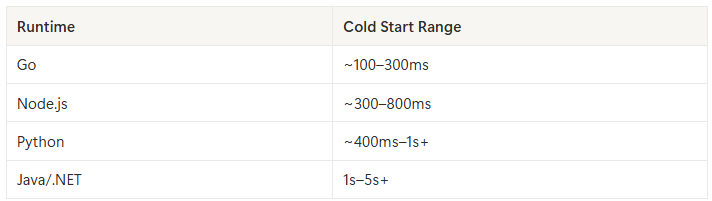
If latency matters, choose runtimes that boot quickly.
Bundle size
The more code and dependencies you ship, the longer it takes to load. Large modules, unused packages, or bundling the entire node_modules folder can slow things down.
Fix: Trim dependencies. Tree-shake and minimize your deployment package.
Initialization code
If you're opening DB connections, loading config files, or running setup logic during the first execution, that delay gets baked into every cold start.
Fix: Defer heavy init logic when possible. Use lazy-loading strategies or pooled resources outside the function.
Memory and CPU allocation
Lower memory functions get fewer CPU cycles, which can extend cold start time. Ironically, giving your function more memory can actually improve performance and reduce latency.
Fix: Benchmark different memory settings and pick the fastest one for your use case, not just the cheapest.
VPC configuration
Attaching your function to a private subnet slows things down. Cold starts inside a VPC often take significantly longer because of the extra networking setup.
Fix: Avoid VPCs unless absolutely necessary. Use managed services outside your VPC when possible.
How to Spot Cold Starts in Production
- Add timestamp logs at the top of your handler and during init
- Compare durations between first invocation and subsequent ones
- Use tracing tools (e.g. AWS X-Ray, Google Cloud Trace) to visualize latency
- Plot p50, p95, and p99 latency, cold starts usually show up at the tail
If you notice a consistent gap between p95 and p50, or if some requests are way slower than others, you’ve got cold starts.
How to Reduce Cold Starts
Use provisioned concurrency
Platforms like AWS Lambda let you pre-warm a fixed number of function instances. They’re always ready, which means zero cold starts, but you’ll pay for it.
Use this for critical paths, auth endpoints, or anything user-facing.
Keep functions warm
You can schedule periodic invocations to prevent instances from idling out. This is a hack, but it's simple and works.
Set up a cron job or scheduled event that pings your function every few minutes.
Optimize init code
Don’t run heavy logic globally or on cold start. Move DB connects or API client setups into request-scoped logic where possible.
Split functions to reduce complexity and isolate cold-prone logic from fast paths.
Reduce bundle size
Use bundlers like esbuild or rollup to strip out unused code. Avoid bloated libraries. Don’t package things that aren’t needed in the function.
Pick better runtimes
Languages like Go and JavaScript tend to cold start faster than Python or Java. If you’re building performance-critical APIs, the runtime choice matters.
Serverless Platforms and Cold Starts
Every provider handles cold starts differently.
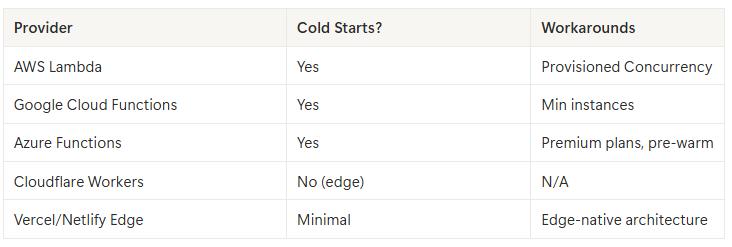
For ultra-low latency, edge functions or WebAssembly-based runtimes usually avoid cold starts altogether.
What You Can Do Right Now
- Audit your serverless functions for init logic
- Measure cold start latency separately from average response time
- Add provisioned concurrency to your highest-traffic endpoints
- Reduce your deployment package size
- Run a long-duration load test and watch p99 latency
Final Thoughts
Cold starts are an unavoidable part of serverless compute, but they don’t have to ruin your performance.
If your app feels fast locally but inconsistent in production, don’t just assume it’s user traffic. Check for cold starts. Measure them. Fix what you can. And use the right tools to prevent them from hurting your users.
Predictable latency beats occasional brilliance.